
A Comprehensive Guide on How to Use Variants in Shopify
For products with multiple variables, deciding on whether to use a parent/variant approach or multiple standalone products is a point that we often discuss when working with clients on replatforming projects. What is the best approach for products with numerous variables?
Initial thoughts
Shopify, like most eCommerce platforms, offers the functionality for both approaches. You can either configure a product as a parent/variant, or use a number of standalone products to represent the variables.
In most cases, variants are set up for the following:
- Size handling
- Product weight handling
- Configurable product options (e.g. a strap attachment for a watch)
- In some cases, product colours are used as variant options - although this is where the catalogue structure can quickly descend into disarray!
If you’re currently using Magento, this is not too dissimilar from the Simple or Configurable setup (whereby the simple setup is the standalone product, and the configurable product is the parent and variant).
Generally this decision boils down to two factors: 1) the type of products being sold by a merchant, and 2) the content available for a given product type/style.
When to use a product variant structure
Having the option to create variants of a given product makes a lot of sense - particularly for fashion brands that sell items of clothing in multiple sizes.
A general rule of thumb for discerning if a product requires variants is based on if content (in terms of assets and imagery) remains a constant across sizes and variants. If this is the case, it makes sense to use variants to offer the different list of product offerings under the parent umbrella. Typically, high price-point luxury brands will require separate parent products where content is distinct enough across product options.
Managing swatches is also a key deciding factor when it comes to linking products together. Natively in Shopify, having variants means that products are automatically linked together via a call to action on a PDP.
We recently worked with Sunspel on their Shopify migration and handling product swatches was a key discussion point. In this case, product colours are separate parent products with their respective sizes as variant options.
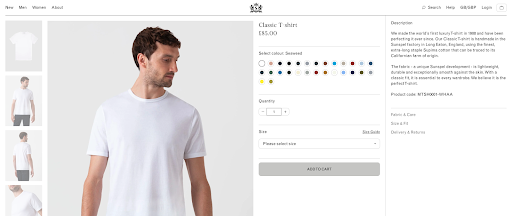
Whilst Shopify suggests variants can be used to offer colour via variants, we have found this to be problematic for a variety of reasons.
Limitations of variants
- Large amount of variants: The first problem is if you’re using two options for a single product variant (e.g. ‘red’ being the colour option and ‘small’ being the size option). It’s possible that you can end up with a large volume of variants by virtue of multiplying size by colour options (do note Shopify has a 250 variant limit).
- Image limitations: Shopify restricts variant options to one single image - this means additional development or an external app is required to store multiple images against a variant - this is problematic when colour options will typically have more than one image.
- Managing paid feeds: Based on the above, we have often seen catalogues where all colour-product imagery is stored against the parent - whilst this can work on the frontend with some code to link variants to images, this promotes a broader issue with regards to managing paid media feeds.
- Limited bespoke content: On top of the above, having variants restricts how bespoke content is for a given option - e.g. if you have a red t-shirt and a blue t-shirt as colour variants, you’re restricted to a singularity for core product data (e.g. a singular product title, product description, handle (URL) and much more). This also means that only parents can be pulled into PLPs - meaning you couldn’t create a single collection for size ‘Large’ products unless the collection URL contained an appended parameter which leverages the size value as a filter.
- Impact on SEO: Product variants are not indexed naturally by search engines from Shopify. It is therefore key that content surrounding variants is crawlable within your page structured data and rich content. Product variants won’t be indexable due to variants being canonicalised to the parent product (native). However, you typically wouldn’t want to change this as you’re unable to inject unique content easily.
URL structure
One final point I’d like to expand on is that variants are accessed using the parent handle:
https://www.sunspel.com/products/mens-short-sleeve-crew-neck-t-shirt-white?variant=46215504560359
- mens-short-sleeve-crew-neck-t-shirt-white: this portion of the URL is the handle. If we were handling colour via variants, you would have a handle along the lines of ‘mens-short-sleeve-crew-neck-t-shirt’
- ?variant=46215504560359: What this means is that your variant options would be stored as IDs - there is no tidy URL here. Having this link with the variant ID appended means that a size-option can be pre-selected on a PDP. Often this link is used for paid media feeds to link customers directly to their selected size.
Whilst this doesn’t cause any drastic issues in terms of accessing a product there are some considerations surrounding SEO, as mentioned above.
When to use a standalone product structure
So when does it make total sense to opt for a standalone product structure for multiple variations?
Having worked with Bremont on a redesign project, it made sense to split products into separate variants. Again, going back to our litmus test of “is the content unique per product type” - in the case of Bremont, a luxury British timepiece manufacturer with rich content, this decision was inevitable.
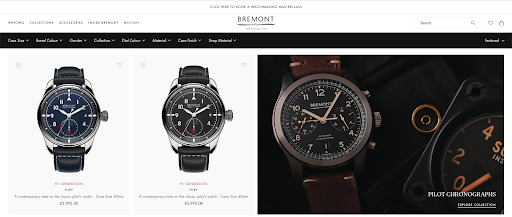
Without the need for custom development, Bremont can display their separate product cards within PLPs and search. These products are housed under their own respective URLs (handles) with unique content across each product (you can see this below with the linked PDPs and some cross-referencing).
Having separate products counters the points and prohibitions above regarding media assets being inaccessible from a product feed perspective. Customers can be linked directly to a given watch PDP and, with great ease, be able to discern the difference between the two timepieces available. You may notice that Bremont has variant options within the two product options, this is for strap sizing as this does not require any content to change on the PDP.
Going back to the Sunspel example above: one thing to bear in mind is the ability to link product colours together when they are separate products (which typically requires additional development). This usually means that a product metafield is required to link SKUs together if they are part of the same product family (e.g. Red Polo Shirt, Blue Polo Shirt etc..) - this can be time consuming - particularly when replicating across stores. We’d recommend using a unique common-denominator between products when referencing (such as SKU or handle).
Limitations of parents
- Limited hreflang referencing: a common requirement within theme builds is being able to offer page-level hreflang referencing. As an example, page handles are unified across The Frankie Shop’s US and EU storefronts.

- Page-level redirects: similar to the above, a regular occurrence is requiring page-level redirects (e.g. navigating to the US version of https://thefrankieshop.com/products/elze-tracksuit-jacket-olive will redirect you to https://eu.thefrankieshop.com/products/elze-tracksuit-jacket-olive) - if colours are a variant option, this will default to the first variant option as product and variant IDs cannot be the same across multiple stores.
- Using product tags is only possible at parent level: this means using product variant metafields are essential as an alternative - it is important that the catalogue isn’t over-architected here with the possibility of having too many metafields
- Making sure solutions can support your structure: Managing areas such as filter options on a PLP/search will need some additional consideration - e.g. using variant metafields to store attributes against size/colour options. You will also need to ensure your search platform can also index variants - if required. Generally speaking, it’s worth ensuring that any apps or solutions being used can interact with variants, so that on-site experience is maintained.
Final thoughts
In summation of the above, it’s definitely key to have this conversation early - particularly during a replatforming project as there are a lot of considerations.
Deciding to restructure a product catalogue if you’re already on Shopify definitely requires a lot more thought - particularly around redirect handling if you’re migrating from variants to parents.
Feel free to message me on LinkedIn with any questions or alternatively fire me an email at [email protected].
Subscribe to our newsletter
Our monthly newsletter is designed to be the most actionable and inspiring eCommerce newsletter in existence, combining examples of eCommerce innovation, benchmarking insights from the industry, and the latest news and eCommerce trends.
By signing up you are agreeing to our privacy policy.